
Say what better sleep would help you do
During onboarding—or later under Profile → Edit Sleep Goals—write a concrete outcome such as “have energy for my morning workout” or “stay focused after lunch.”
Gate 1 beta field guide
Help test whether Sleep League can turn your sleep data and one controllable action into an honest, useful next step.
What we are learning
Start one focused experiment, track the action, understand what Sleep League observed, and make a sensible decision when the experiment ends. Notice every point where you hesitate, mistrust the data, or need help.
Do the action when you genuinely can and record misses honestly. Do not skip it just to create comparison data, and do not change medication or ignore medical advice for this test.
01 / BEFORE NIGHT ONE
Use the latest beta build. Existing testers should open TestFlight or Google Play first and confirm there is no update waiting.
During onboarding—or later under Profile → Edit Sleep Goals—write a concrete outcome such as “have energy for my morning workout” or “stay focused after lunch.”
Allow Apple Health or Health Connect access. If you do not have compatible data, use Log Sleep; manual entry is a supported path, not a workaround.
Choose an action that is small, specific, and under your control. Confirm that the experiment shown on Today is the one you intend to focus on.
Choose a bedtime/in-bed-by or wake-time action. Sleep League should evaluate it from the matching boundary in your synced sleep observation.
Choose another controllable action and mark it yourself each day. This tests the same learning loop without automatic detection.
02 / EACH MORNING
Open Today after your health app or wearable has processed the night. Then follow the same short check each morning.
Look for a successful sync and a recent sleep record. If data is missing or stale, tap Sync Now. Follow the permission guidance or use Log Sleep if needed.
Confirm the date, bedtime, wake time, and duration look plausible. Pay special attention to naps, overnight records, duplicates, or a night attached to the wrong date.
A supported bedtime or wake-time action may show Detected. If the status is wrong, tap it to correct or undo it. Mark other actions manually and honestly.
Leave and reopen the screen. A corrected status should remain corrected; a later sync should not silently change your judgment back.
03 / ON TWO OR THREE NIGHTS
Open a night’s details and expand the Sleep Score breakdown. You do not need to audit every night; sample a few different-looking records.
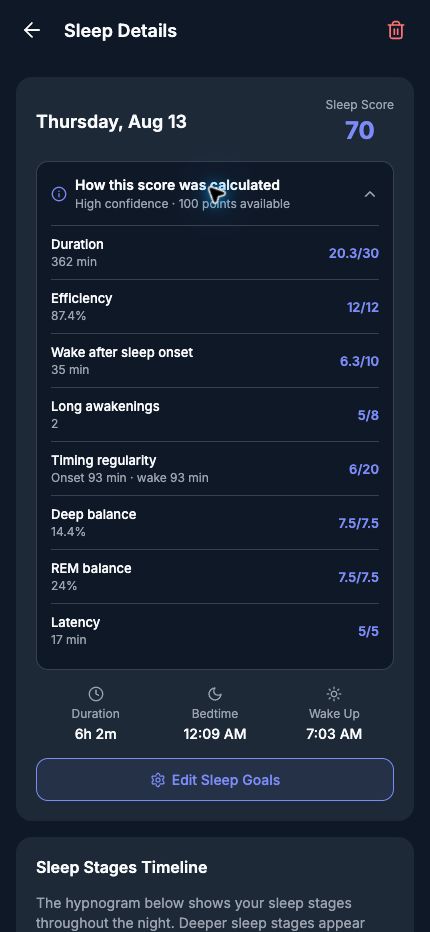
Tap the score breakdown to reveal the available points, confidence, and the observations that contributed. Select the image to inspect the full screen.
Can you tell which observations contributed—such as duration, continuity, timing, stages, or latency?
Does the confidence level make sense for the amount and quality of data available?
Does Sleep League admit what it did not receive instead of filling gaps or pretending precision?
04 / WHEN THE EXPERIMENT ENDS
Open the result when Sleep League says it is ready. Read the plain-language conclusion before exploring the chart.
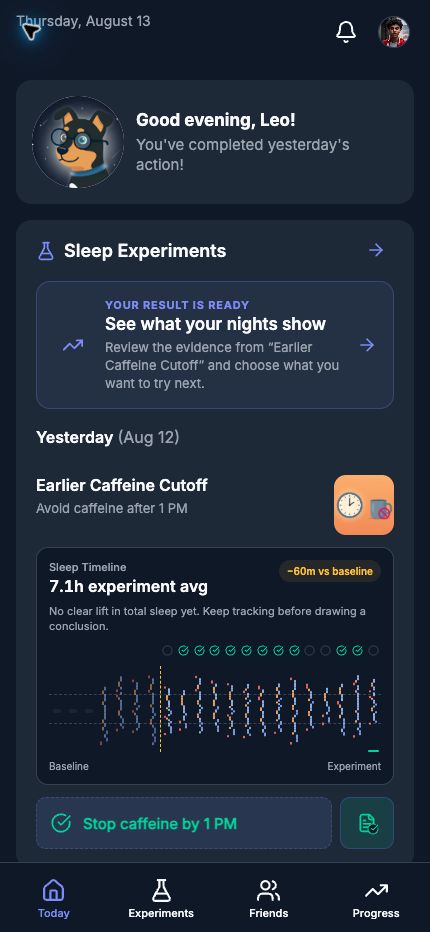
The Today screen should make the next step unmistakable without blocking your timeline or final action check-in. Select the image to see the full screen.
Find how many eligible nights had the action completed and how many did not. A useful comparison needs observations in both groups.
The result should say “appears to” or describe an association. It should never claim that your action caused an outcome the data cannot prove.
Use the in-app prompt even when the answer is no. Then choose Keep it, Adjust it, or Replace it.
You should be able to continue with your decision or start the next experiment without asking Scott what to tap.
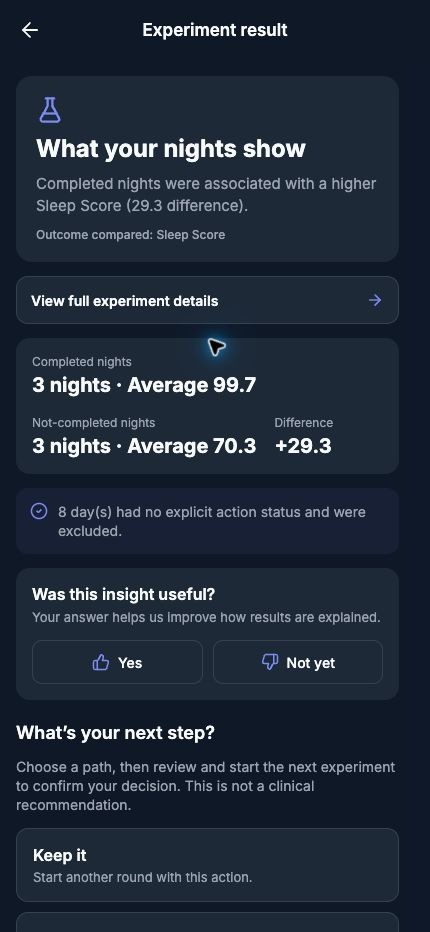
Check the cautious wording, both sample sizes, excluded nights, and whether the next-step choices feel sensible. Select the image to see the full result.
Ask whether it is understandable, cautious, and consistent with the nights shown.
That is a valid result. Ask whether the explanation makes the limitation and next choice clear.
05 / ASK THE AI ANALYST
Sleep League includes one clearly labeled AI surface. You get one short insight each morning by default, grounded in your own recent nights, and you can ask it questions directly.
Its answers and daily insight cite the sleep-science sources they draw on. Check that a citation is actually relevant to the claim it supports.
It can create or modify an experiment, but only after showing you the exact change and waiting for your explicit confirmation. It never acts on its own.
Switch between daily and weekly, mute it, or change the delivery time from AI settings at any point.
06 / PRIVACY, SUPPORT, AND FOUNDERS
Beta operations need enough information to see whether the learning loop works, but they do not turn your private sleep record into campaign data.
Your beta roster details, phone platform, app/build activity, major setup and experiment milestones, and whether campaign email was delivered, delayed, bounced, or unsubscribed.
Campaign reporting does not include raw nightly sleep values, sleep stages, journal text, private messages, or email opens and link clicks. Sleep details are not shared with friends by default.
No. It is a valid result when the app does not have enough reliable completed and missed nights to support a directional comparison. The useful question is whether the limitation and next choice are clear.
Your Founders offer remains part of the plan. Scott will make sure it is recognized when paid access is introduced in the mobile apps.
Scott approves every recruitment and follow-up send. Every campaign email includes an unsubscribe link. Delivery is recorded for operations; opens and link clicks are not tracked.
07 / TELL SCOTT WHAT HAPPENED
Please do not work around a rough edge silently. The moments that make you pause are often more useful than a general “looks good.”
Open Settings → Support & Feedback → Report a Problem. Include a screenshot when useful, what you expected, what happened, and the approximate date and time.
Sleep League is a beta self-observation tool, not medical advice or a substitute for professional care. Stop an experiment that makes you feel worse or unsafe, and talk with a qualified clinician about persistent sleep concerns.